
Everything Going On Inside a Smartphone, Explained Simply
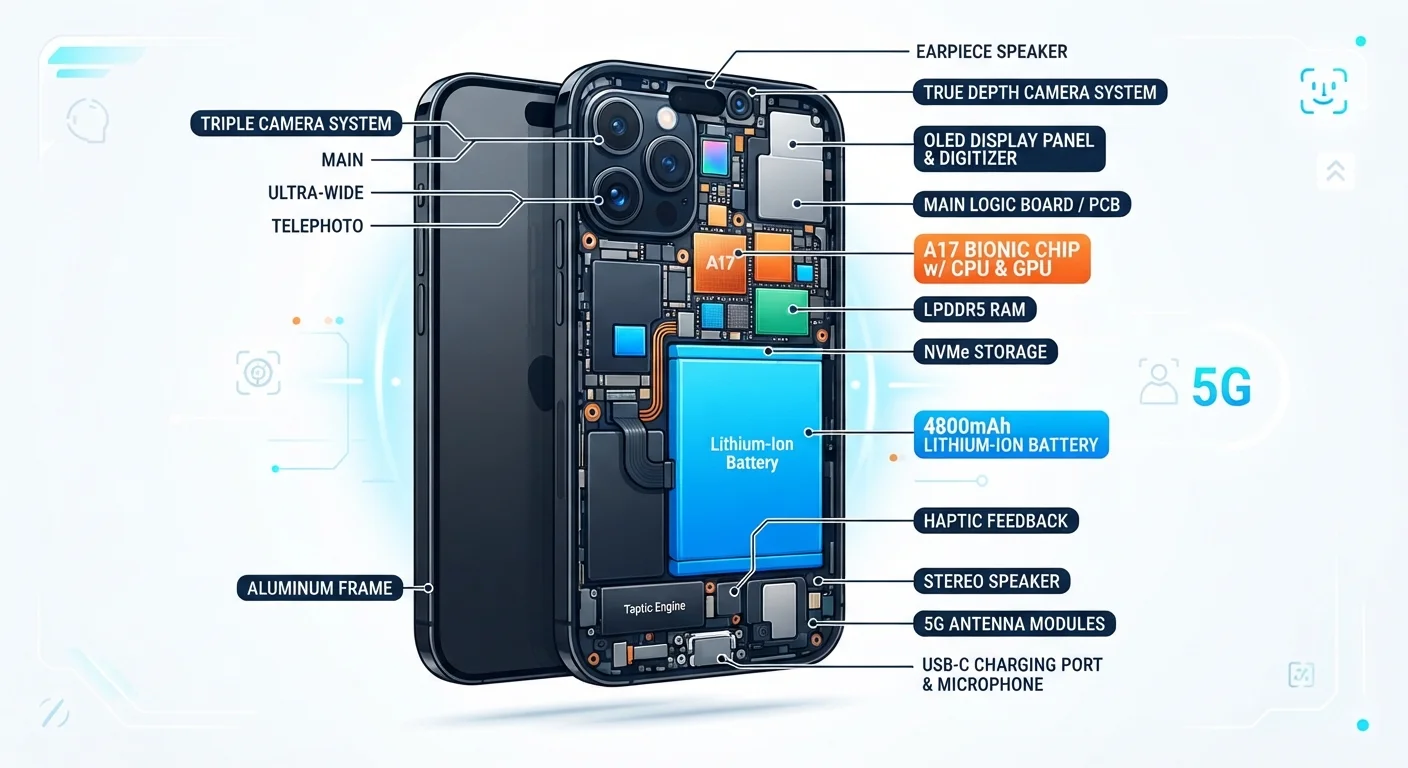
Photo credit: TrendingExperts.net
In this article
From the chipset to the camera sensor, here's a clear breakdown of how the device in your pocket actually works.
Key Takeaways
- The chipset is the central hub coordinating everything your phone does, from running apps to processing photos.
- RAM and storage are different: RAM handles active tasks while storage holds your files and apps long-term.
- Camera quality depends on more than megapixels - sensor size, aperture, and software processing all matter.
- Your phone maintains multiple simultaneous wireless connections including cellular, Wi-Fi, Bluetooth, and GPS.
- Dozens of hidden sensors make features like screen rotation, face unlock, and step counting possible.
- Understanding your phone's hardware helps you make smarter decisions about apps, settings, and future devices.
The Brain: Chipset and Processor
At the core of every smartphone sits a chipset - sometimes called a SoC, or System on a Chip. Think of it as the entire command center of your phone, miniaturized onto a piece of silicon smaller than your thumbnail. It houses the processor (CPU), graphics processor (GPU), and several specialized sub-processors, all working in concert.
The CPU handles general logic and calculations - opening apps, running the operating system, responding to taps. Most modern chipsets have multiple CPU cores, which allows the phone to handle several tasks simultaneously without slowing down. The GPU takes over for anything visually demanding, like games or video playback. Many chipsets also include a dedicated neural processing unit (NPU) - a mini AI engine that accelerates tasks like voice recognition and real-time photo enhancement.
For a deeper look at what processor specs actually mean in everyday use, see our guide to RAM, storage, and processing speed.
When comparing chipsets, look at the manufacturing process node (e.g., 4nm vs. 7nm) - a smaller number generally means the chip runs more efficiently, producing less heat and better battery life.
The fabrication process directly affects how many transistors fit on a chip and how much power each one consumes, which has real-world impact on daily performance.
Don't judge a camera solely by megapixels. A 12MP sensor that's physically large will typically outperform a 50MP sensor on a tiny chip in low-light conditions.
Sensor size determines how much light each pixel can capture; more light means less digital noise and better detail in challenging conditions.
Memory and Storage: Two Very Different Things
People often use "memory" and "storage" interchangeably, but they serve completely different roles. RAM (Random Access Memory) is your phone's short-term workspace. When you open an app, it gets loaded into RAM so the phone can access it quickly. More RAM generally means more apps can stay open in the background without reloading.
Storage - measured in gigabytes (GB) - is the long-term filing cabinet where your photos, apps, music, and documents live even when the phone is powered off. Once you fill it up, you'll need to delete files or move them to a cloud service.
A common real-world analogy: RAM is your desk and storage is the filing cabinet behind you. A bigger desk means more work spread out in front of you; a bigger cabinet means more files you can keep.
The Display: More Than Just a Screen
The screen is the main way you interact with your phone, and it's more technically sophisticated than it appears. Two common display technologies are LCD (Liquid Crystal Display) and OLED (Organic Light-Emitting Diode). OLED screens produce their own light per pixel, enabling true blacks and vivid contrast; LCD screens use a backlight behind the panel, which is generally more power-efficient at high brightness.
Refresh rate, measured in Hz, describes how many times per second the screen redraws the image. A 60Hz display updates 60 times per second; a 120Hz display updates 120 times, making scrolling and animations feel noticeably smoother. Higher refresh rates do consume more battery, which is why many phones now use adaptive refresh rates that scale up or down based on what's on screen.
Resolution (the number of pixels) determines sharpness, while nits measure peak brightness - important for outdoor readability in sunlight. Our tech glossary explains these and other display terms in plain language.
The Camera System
Modern phones often carry multiple camera lenses - wide, ultrawide, and telephoto - each serving a distinct purpose. But the lens is only part of the story. The image sensor behind the lens captures light and converts it into digital data. Larger sensors gather more light, which generally improves low-light photography regardless of megapixel count.
Aperture (expressed as an f-number like f/1.8) controls how much light enters the lens. A lower f-number means a wider opening and better low-light performance. Meanwhile, optical image stabilization (OIS) uses tiny physical movements to counteract hand shake, producing sharper photos and steadier video.
Megapixels Don't Tell the Whole Story
Marketing materials frequently highlight megapixel counts, but a higher number doesn't automatically mean better photos. Sensor size, lens quality, aperture, and software processing all play significant roles. Relying on megapixels alone as a quality indicator can lead to disappointment. Check independent photography tests or sample images when evaluating camera performance.
Software processing - sometimes called computational photography - plays an equally large role. The phone's NPU analyzes scenes, applies noise reduction, merges multiple exposures, and sharpens edges, often in fractions of a second. This is why two phones with similar hardware specs can produce very different-looking photos.
Connectivity: How Your Phone Talks to the World
Your phone maintains several wireless connections simultaneously, each handled by dedicated antenna hardware and radio chips. Cellular (4G LTE or 5G) provides your mobile data connection through carrier towers. Wi-Fi connects you to local networks. Bluetooth links to nearby accessories like earbuds and smartwatches. GPS - technically a receive-only system - picks up signals from satellites to calculate your location.
Near Field Communication (NFC) enables short-range data exchange, powering contactless payments and quick device pairing. Some phones also include Ultra-Wideband (UWB) radio for precise spatial awareness, used in features like digital car keys.
All of these radios draw power, which is one reason toggling off Wi-Fi, Bluetooth, or location services when not in use can extend battery life. For more on how background data activity affects your device, see what syncing really does.
The Battery and Power Management
Smartphone batteries are lithium-ion cells, chosen for their high energy density and rechargeable lifespan. Capacity is rated in milliampere-hours (mAh) - a higher number generally means more hours of use before needing a charge, though actual battery life depends heavily on how power-hungry the screen, chipset, and radios are running at any given moment.
A dedicated power management chip acts as a traffic controller, directing electricity from the battery to each component according to demand. It also manages charging speed and thermal regulation to protect the battery's long-term health. Most phones now support fast charging, which temporarily increases the voltage during the early phase of charging for quicker top-ups.
Lithium-ion batteries gradually lose capacity over hundreds of charge cycles. Keeping the phone from spending extended periods at 100% or 0% charge is generally thought to help preserve long-term battery health, though the evidence on specific thresholds varies.
Sensors: The Invisible Intelligence
A typical smartphone contains over a dozen sensors quietly doing work in the background. The accelerometer detects motion and orientation, enabling auto-rotate. The gyroscope measures rotational movement for immersive apps and image stabilization. The proximity sensor turns off the screen when you hold the phone to your ear during a call.
The ambient light sensor adjusts screen brightness automatically based on surrounding light levels. A barometer measures air pressure, aiding GPS accuracy and altitude detection. Biometric sensors - fingerprint readers or face recognition cameras - authenticate your identity. The magnetometer functions as a digital compass inside map apps.
All of these components communicate through internal data buses to the main chipset, which interprets their signals and acts accordingly - often in milliseconds. Understanding what's happening under the hood can help you make smarter choices about settings, security features, and how you use your phone day to day.

Author
Technology Editorial Team
Technology Editorial Team is the collective byline for our editorial team and contributor network. Articles published under this byline or an editorial pen name are researched, written, and reviewed according to our editorial standards for clarity, consistency, and independence before publication.
View all articles →